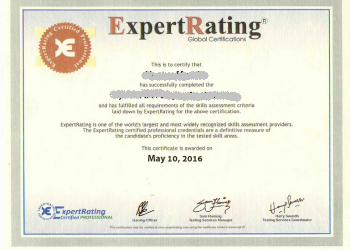
The ExpertRating Online Web Page Design Course (leading to ExpertRating Web Page Design
Certification).
Create and post
your very own Web site on the Internet in this extensive, hands-on,
six week workshop. First, you'll learn about the capabilities of the
World Wide Web and the fundamentals of web design.
Then, with your
instructor's patient guidance, you'll plan the content, structure
and layout of your Web site, create pages full of neatly formatted
text, build links between the pages and to the outside world, and
add color, backgrounds, graphics, tables, hot buttons, and
animation. You'll also learn critical and timely information on
securing the best possible location in search engine listings, and
powerful no-cost or low-cost web marketing strategies.
This course includes a knowledgeable
and caring instructor who will guide you through your lessons,
facilitate discussions, and answer your questions. The instructor
for this course will be Craig Power.
Craig Power
About
the
ExpertRating Online Web Page Design Course instructor :
Craig Power has worked in adult continuing education for more
than 18 years. A UCLA graduate, he created custom accounting
software for state and local governments; developed an online course
delivery and marketing platform currently used by more than 1,500
colleges and universities in the US, Canada, and Australia;
developed an interactive cellular biology video for the Los Angeles
Unified School District; taught college-level information technology
courses; started and grew a thriving small business; and served as
an executive with a large academic publishing corporation.
Creating Web Pages Course requirements:
For taking this instructor led ExpertRating Online Web Page Design Course you need
Internet access, E-mail, and the Microsoft Internet Explorer or
Mozilla Firefox Web browser, familiarity with the Internet, and a
computer of any type.
Testimonials:
The ExpertRating Online Web Page Design Course has received overwhelming positive
feedback and reviews from students around the world. Here are a few:
"An
absolute winner! This course was great. I got everything I needed out of the
course and more. The use of supplementary material and assignments were
excellent."
"As
a teacher I am amazed at how smoothly this course progressed. The instructor has
put a lot of time and effort into this program. Congratulations!"
"Excellent
job! This course has definitely encouraged me to try others. Right time, right
pace, right everything. Thank you!"
"Excellent
teacher! Well laid out, lots of support for the students (questions were
answered promptly and well monitored). Far exceeded my expectations."
"Fantastic
Course! Forget about paying thousands of dollars to attend 2-4 day crash
courses. With 12 lessons spread over 6 weeks, assignments, quizzes, a final
exam, and class discussion, you will learn FAR more with this course at a better
price. For the working adult who can spare a couple of hours a week toward his
or her class work, the on-line format for course instruction is the way to go. I
have plenty of experience with education, having earned both a Bachelor's and
Master's degree in electrical engineering. I can tell you, on-line instruction
is the wave of the future. In regards to Creating Web Pages, by Craig Power, it
is OUTSTANDING!! I give him the highest possible marks. If you want to learn how
to "correctly" develop a website, take this course. I guarantee, you will not be
disappointed."
"Great
course, great instructor. I'd always wanted to learn HTML but was too
intimidated to take a class in a traditional setting. By doing the course online
I could go at my own pace and not feel embarrassed if I had to go over something
a couple of times to "get" it."
"Great
course; instructor obviously knowledgeable regarding subject area. Instructor is
able to teach and explain the information presented in a concise understandable
format. This is a very worthwhile course on the subject matter presented."
"Hello,
A very good course for working Graphic Designs/Artists. I have a small graphics
business and a few of my clients started bugging me to take this step. It works
well with the way my time line changes. Thanks, and I will be applying my new
skills as soon as I get a little building experience."
"I
enjoyed the opportunity to complete the lesson and assignments when I had the
time. The material was presented in a sequential manner that built upon the
previous lesson. Although I did not post a question in the discussion area, I
learned from the questions and answers posted. I would like to see the lessons
released early as I often had time between the Friday and Wednesday class and
could have started on the next lesson. As it was, I had to concentrate on both
weekly lessons over the weekend."
"I
have taken several online courses and this one by far was the best. Lots of good
reference material and it was interesting. The format of the assignments was the
best. Craig also gave very good web sites as a reference for points he was
making in the lessons. I give this course an A++ Thanks for a great course."
"I
really enjoyed this course as it taught me the principles of HTML coding in an
easy to understand step by step format. The instructor did a great job! I am
also proud that I am 51 years old and going back to college!"
ExpertRating Online Web Page Design Course
(leading to
ExpertRating Web Design Certification)
ExpertRating is one of the world's only ISO
9001:2000 Certified companies (from TUV America) offering an
ExpertRating Online Web Page Design Course (leading to ExpertRating Web Design Certification).
ExpertRating is a trusted name in online
testing and certification with over 200,000 certified professionals
in over 60 countries in more than 200 skill areas. ExpertRating
offers its testing services to the world's best companies such as
Convergys Corp, UPS, GAP, Sony, Coke, Citrix, Deltek Corp, IKEA
Systems and Ericsson to name a few. See where
ExpertRating Certified Professionals are working.
It is very safe to buy from
ExpertRating. Apart from being an ISO 9001:2000 company, it is a
Square Trade business member since 2002 and HackerSafe approved.
ExpertRating has certified Several thousand individuals who are
working with leading companies across the US and other countries. View
list.
When you choose the
ExpertRating Online Web Page Design Course you can be sure that you are buying a
premium International certification that is recognized by hundreds
of employers and Government bodies in the US and other countries.
With ExpertRating you get certified
quickly online and you are equipped with a store house of
information through the in-depth ExpertRating Online Web Page Design Courseware which has
been developed by experienced Web Page Designing Experts.
The ExpertRating Web Page Design Certification is by far the best value for money instructor led
WebPage Design Program at $99.99 .
Some Popular questions and answers about
this ExpertRating Online Web Page Design Courseand Certification:
How much does the
Web Design Certification cost and what does it include?
You can buy this ExpertRating Online Web Page Design Course
leading to
Web Design certification at a special offer price of only $99.99 which
includes the in-depth ExpertRating Online Web Page Design Courseware and exam fee. This is
the best value for money Web Design Program available till date. You
get the following services within the USD $99.99 fee.
In-depth ExpertRating Online Web Page Design Courseware including scenarios and case studies.
An instructor to guide you through the
course and to whom you can direct your questions.
World wide airmail delivery of the hard
copy Web Design Certificate. The Web Design Certificate can be used
to prove your certified status and does not mention the words
"online".
An online transcript that can be used to
prove your certified credentials on the internet at any time.
How do I get certified?
The process of getting yourself certified is very simple. All you have to do is buy the
ExpertRating Online Web Page Design Course for $99.99 . Log in to the instructor led course using your password. Go through the
ExpertRating Online Web Page Design Courseware (which would take you 6 weeks) and complete the final
Web Design Certification exam at your convenience. You can complete the exam within 2 months of buying the
Web Design Certification. The result of the exam appears as soon as it is completed, and your
Web Design Certificate is mailed immediately.
What learning aids will I get?
The
ExpertRating Online Web Page Design Course includes the following learning aids:
24 x 7 hour access to the courseware. A printer friendly version of the
ExpertRating Online Web Page Design Course is also provided
A friendly instructor to answer your questions online
A discussion area to have your questions answered
Chapter end quizzes to ensure that you are learning important aspects of every chapter
Chapter assignments to help you practically use the
Web Design that you will learn during the Web Design Course.
What is the final exam like?
The final exam is fully based upon the
ExpertRating Online Web Page Design Courseware that is provided along with the
Web Design Certification. If you have gone through the courseware properly you should not have a problem clearing the exam. The exam consists of multiple choice questions from all chapters of the
ExpertRating Online Web Page Design Courseware.
What are the course start dates?
ExpertRating instructor led courses commence
every month, you can always choose a suitable date for your course
commencement in any month. To see available course start dates,
please click on the "Enroll now" button.
All courses run for six weeks, with a two-week grace period at the end. Two lessons are released each week for the six-week duration of the course. You do not have to be present when the lesson is released, but you must complete each lesson within two weeks of its release.
A new section of each course starts on the second or third Wednesday of each month. If enrolling in a series of two or more courses please be sure to space the start date for each course at least two months apart.
Relevant
and beautiful web designs increase market share and audience reach.
A web page or
webpage is a resource of information that is suitable for the World
Wide Web and can be accessed through a web browser. HTML is the
language of web pages. It is the basis of the World Wide Web. It
helps one in creating, and designing a web page. HTML files are
simple text files. To start writing in HTML, a simple text editor is
needed. The uses of HTML lie in developing "Web Pages”, attractively
displaying information on a web page, adding links in a web page
through the Hypertext feature and arranging all the information
sequentially with links.
Taking the highly recognized ExpertRating Creating Web Pages
Certification course is an excellent way for you to prove your
professional prowess to employers while giving a boost to your
resume.
ExpertRating Online Web Page Design Course
Coverage (6 weeks program)
Week One
Wednesday - Lesson 01
In this lesson,
you'll learn where the web came from and how it
works. This lesson is important because you
won't be able to fully exploit this new medium
until you develop a complete understanding of
its history and capabilities.
Friday - Lesson 02
This lesson will
help you get organized. You'll learn the guiding
principles of web design and how to choose the
best navigational structure for your site. In
this lesson, you'll learn the basics of HTML:
the language of the web. You'll also get the
opportunity to build and view your very first
web page!
Week Two
Wednesday - Lesson 03
On this day,
you'll learn how to jazz up your pages by
adjusting the alignment and indentation of your
text. You'll also learn how to work with
different typefaces, type sizes and colors.
Friday - Lesson 04
This lesson will
teach you how to add a little visual excitement
to your pages by mixing a few graphics with your
text. You'll find out how to download images
right off the Web without running afoul of
copyright laws, and you'll learn about two image
formats supported by the Web: GIF and JPEG.
You'll learn where they came from, how they
work, and when it's best to choose one image
format over the other. You'll also learn how to
properly tag your graphics so your site remains
accessible to all users, including people who
cannot see images.
Week Three
Wednesday - Lesson 05-
Have you ever had
to wait a long time for an image-laden Web page
to assemble itself on your screen? In this
lesson, you'll learn some tricks you can use
with your graphics to make your Web pages seem
to load faster. You'll find out how you can
pre-specify your image dimensions, essentially
reserving space for large graphics before they
load. You'll also discover a few ways to
optimize your images for the fastest possible
download time. You'll learn how to incorporate
an image into the background of your Web page,
and you'll find out how to add animated images
to the pages you create.
Friday - Lesson 06
This is perhaps
the most important of all lessons. In most
cases, the popularity of your web site will be
directly related to its position in the search
engine listings. Your goal as a web designer
should be to engineer your site so that its
pages get the best position possible on any
search results page. In this lesson, you're
going to learn several strategies designed
specifically to give you the best possible
search engine results.
Week Four
Wednesday - Lesson 07
This lesson will
teach you how to help people navigate through
all the pages of your site. You'll learn how to
build hypertext links and hot buttons that
people can click on to glide effortlessly from
one page of your site to the next. You'll also
learn how to build links to your e-mailbox,
pages on other sites, or to a specific paragraph
on one of your own pages.
Friday - Lesson 08
This lesson will
teach you all the HTML you'll need to know in
order to arrange your words, links and images
into orderly arrangements of columns and rows.
Week Five
Wednesday - Lesson 09
In this lesson,
you'll learn about some of the more exciting
things that you can do with tables. You'll learn
how to adjust the size of the columns, rows and
cells that make up your tables, change the
background color of each cell in a table, adjust
the alignment of text inside your table, and
more. By the time this lesson is over, you
should be well-prepared to transform a humdrum
page into something a bit more visually
exciting.
Friday - Lesson 10
This lesson will
begin with a brief introduction to authoring
systems, which can be used to help automate the
Web-building process. You will also receive a
comprehensive HTML reference, a powerful guide
to the language you have learned in this course.
You're sure to refer to it again and again!
Week Six
Wednesday - Lesson 11
By now, you
should have a fully functional web site complete
with two or more pages of text, links, graphics,
animation, tables, a background, and whatever
else you came up with. By now, you'll surely be
anxious to put your labor of love on public
display! This week, you'll get that opportunity.
But first, you'll need to select a hosting
service. When selecting a web host, nine very
important questions have to be asked. You'll
learn what those questions are in this lesson.